Maciej Cieślukowski
Senior UX Researcher
Voice assistants used to be a fun gimmick that most people quickly forgot about in the daily rush. But as the technology has gotten dramatically better at understanding natural speech, holding context across a conversation, and taking action instead of just answering questions, it has opened up entirely new possibilities for businesses and consumers alike.
After all, it's much safer to issue a voice command than to take your hands off the wheel on a busy highway. It's also far more convenient when your hands are full of grocery bags and you just need to add one more item to next week's order, and it can be a genuine life-saver for an elderly parent who finds a touchscreen more trouble than it's worth.
But despite all these new possibilities, a good old keyboard can still beat a voice assistant in specific circumstances, particularly when a task is precise, private, or long. The important thing for businesses is figuring out which scenario calls for which technology.
In other words, it's all about matching the right interface to the right task.
According to Nielsen Norman Group's study on usability (2018), voice assistants are used most often in two types of situations:
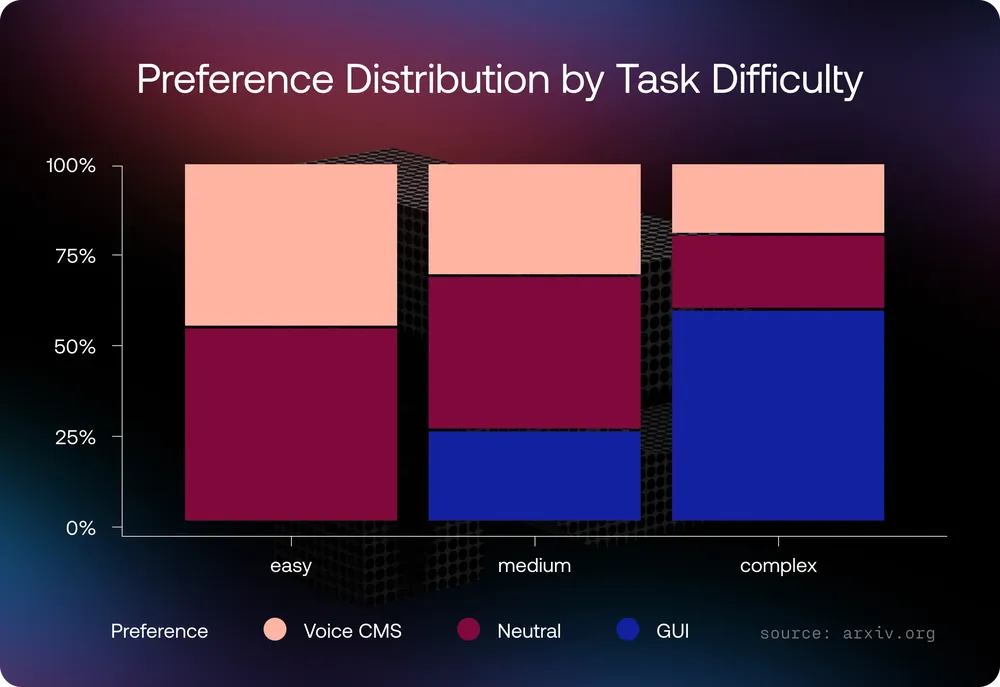
The latter is further confirmed by the Orange Research Warsaw study published in 2025; voice CMS triumphed over graphical user interface only in the case of easy and medium tasks.
Meanwhile, the research published in IEEE Access, “Why College Students Prefer Typing Over Speech Input: The Dual Perspective”, found that users tend to prefer typing due to the following reasons:
Additionally, voice assistants are bad at handling many options at once. Amazon ships Alexa with a companion app for exactly this reason: you can build a shopping list by asking Alexa to add items one at a time, but then review, reorder, or edit that same list on a screen. Anywhere a task involves comparing several things, correcting a misheard detail, or leaving a written record to check later, screen tends to win. The reason for that has less to do with how smart the voice model is – the crux of the matter lies in the shape of the task itself.
Our own research confirms this pattern in a different setting entirely. In 2026, we ran a study for a Polish logistics company and found that preference for typing versus talking to an AI assistant came down largely to habit: people who had spent decades typing on a keyboard stayed loyal to it, with little interest in switching.
Typing won out clearly in two situations: entering long numbers, like a tracking number, and entering detailed information, like a delivery address. Typing lets people copy and paste directly, while dictating a long string of digits takes more effort and carries the nagging worry that the assistant might mishear one, forcing a manual double-check anyway.
Voice won when people wanted help or more information: asking a question and getting an answer out loud felt faster and easier than typing it out. One finding surprised us; users expected the assistant to ask follow-up questions when their own request was vague, the same way a colleague would. People aren't used to loading every relevant detail into a single query upfront. They expect the other side of the conversation to ask.
To back the theory, let’s take a closer look at real-world examples for different use cases.
Bank of America's Erica, launched in 2018, passed 3 billion client interactions in August 2025 and has assisted nearly 50 million users since launch. Its success can be attributed to treating both voice and written channels as first-class, refusing to force a single interface. Consumers can easily ask about a balance or recent transaction while resorting to typing for more complex tasks: disputing a charge, adjusting an account setting, or double-checking their provided information. This lines up with the idea that the two channels solve different problems rather than one being categorically better.
Salesforce built "Voice to Form" into Agentforce Field Service so technicians can fill out job reports by speaking instead of typing on a phone screen mid-repair. According to Salesforce, a ten-question form that takes several minutes to complete by typing takes about 30 seconds using Voice to Form. This is the clearest version of the voice-wins condition: a technician's hands are on a tool, not a keyboard, and the form fields are short enough to speak in one go. Compare that to an office worker updating a detailed project plan at a desk, where typing, dragging, and reordering fields are simply faster than describing the same changes out loud, and the contrast holds.
In 2019, Walmart partnered with Apple to let customers reorder groceries by asking Siri. The system leans on purchase history, so asking for "orange juice" adds the specific carton the customer bought last time, not a random match. That's voice doing what it's good at: a short, repeat request where the user already knows exactly what they want. It's a much weaker fit for browsing a new product category, comparing prices, or reading reviews – all tasks that depend on seeing several things side by side. Voice commerce has grown fastest in reordering and replenishment, not discovery, and that's not a temporary limitation waiting on better speech models. It's a mismatch between the task and the interface.
Nuance's Dragon Ambient eXperience (DAX), built on Microsoft Azure, listens to the conversation between a doctor and patient during an appointment and drafts the clinical note automatically, without either party issuing voice commands. Nuance points to Medscape data showing 42% of doctors report burnout, and says physicians using DAX save multiple hours a week that would otherwise go to typing up notes after hours.
Two developments are worth tracking, and both extend the framework above rather than break it.
The first is multimodal, low-latency models like Google's Gemini Live, which can see, hear, and respond in the same real-time conversation. That matters because it removes one of voice's oldest weaknesses: the inability to reference something visual mid-conversation. One entry in Google's own Gemini Live Agent Challenge, called Relay, uses a webcam to watch a user's electronics project in real time and gives step-by-step voice instructions, catching wiring mistakes before they happen. That's the gap between "hands-free" and "actually good at complex tasks" starting to close.
The second is voice paired with function calling, the mechanism that lets a spoken request trigger a real action instead of just an answer. Another entry in the same challenge, Call My Parts, let users speak a part request out loud, after which the agent autonomously searched vendor websites and called suppliers to compare price and availability. That's the shift from "voice assistant" to "voice-directed agent," and it will pull more tasks into the voice-friendly zone, mainly ones that are quick to describe but tedious to execute by hand.
The research keeps pointing to the same place: it's the task, not the technology, that determines the outcome. Hands busy, or asking faster than typing and reading? Voice wins. Something precise, private, or long? The keyboard wins, whether that's a customer disputing a charge with Bank of America's Erica, a technician filling out a field report through Salesforce's Voice to Form, or a shopper reordering the same groceries through Walmart and Siri. Nuance's DAX barely counts as a voice interface at all, and that's exactly why it works: the best implementations don't ask people to talk to a machine, they just remove the keyboard from a task that never needed one. The developments on the horizon, multimodal models, voice paired with function calling, will pull more tasks into the voice-friendly zone, but they won't change the underlying question.
None of the four cases in this piece needed a smarter voice model to work. They needed someone to ask a narrower question: what is this specific person doing with their hands, their eyes, and their time right now? A technician pulling off a glove to type a serial number, then pulling it back on to keep working, is the whole argument in miniature. Give people the voice feature exactly where that's the real friction, and give them a screen everywhere else. That's a smaller, cheaper question than "what's the future of the interface," and it's the one actually worth answering.

M. Cieślukowski - Senior UX Researcher

J. Nawrocki - Lead UX Researcher

P. Nawrocki - Product Designer

I. Franke - Head of Advisory